Good Mobile Support

  • Subscribe to our RSS feed.
  • Twitter
  • StumbleUpon
  • Reddit
  • Facebook
  • Digg

Thursday, 17 July 2008

New toolbar, AJAX saving, and other fixes for the post editor

Posted on 16:48 by Unknown
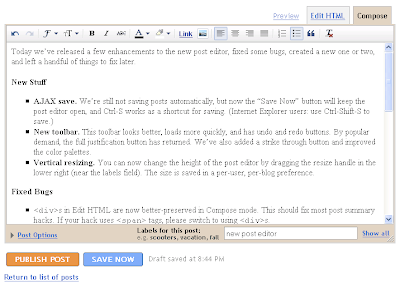
Today we’ve released a few enhancements to the new post editor, fixed some bugs, created a new one or two, and left a handful of things to fix later.


New Stuff

  • AJAX save. We’re still not saving posts automatically, but now the “Save Now” button will keep the post editor open, and Ctrl-S works as a shortcut for saving. (Internet Explorer users: use Ctrl-Shift-S to save.)

  • New toolbar. This toolbar looks better, loads more quickly, and has undo and redo buttons. By popular demand, the full justification button has returned. We’ve also added a strike through button and improved the color palettes.


  • Vertical resizing. You can now change the height of the post editor by dragging the resize handle in the lower right (near the labels field). The size is saved in a per-user, per-blog preference.

Fixed Bugs

  • <div>s in Edit HTML are now better-preserved in Compose mode. This should fix most post summary hacks. If your hack uses <span> tags, please switch to using <div>s.

  • Lists created in Compose mode can now have new items added to them after switching to Edit HTML and back.

  • Line breaking is no longer lost when editing a post in the old editor that was first written in the new editor.

  • Nested block-level elements no longer create odd blank lines.

  • Non-breaking spaces now consistently appear as &nbsp; in Edit HTML mode.

New Bugs (that we know about)

  • The publish and save buttons wrap oddly on Mac browsers.

Major Remaining Bugs (that we know about)

  • The Font Size menu has 4 sizes instead of 5, and “normal” looks small.

  • Paragraph tags are lost when switching from Edit HTML to Compose.

  • The Blockquote button still behaves oddly, especially in Internet Explorer.

  • The URL an image links to cannot be changed without using Edit HTML mode.

  • Images inserted with this editor do not pick up border styles from the blog template.

  • Inserting a new link with the link dialog loses your place in the post. 

Find anything else? See: How to report HTML bugs with the new post editor


Things Left To Add

  • Toolbar in Edit HTML mode

  • Autosave

  • Spellcheck

  • Video upload

  • FTP image upload

  • Bi-directional text input and Indic transliteration 

  • and a handful of smaller things too numerous to include here

Read More
Posted in new post editor | No comments

Tuesday, 1 July 2008

How to report HTML bugs with the new post editor

Posted on 11:36 by Unknown
We’d like to thank everyone who has been trying out the new post editor on Blogger in Draft and putting it through its paces. As many of you have noticed, the new editor handles HTML somewhat differently from the old editor, and tricks and conventions you may be used to are not working or screwing up your post’s formatting.

We would like to fix as many inconsistencies and problems as we can before we unleash the new editor on all Blogger users, so we’d really appreciate reproducible bug reports when you see a problem.

The three key pieces of a helpful bug report are:
  • “I typed/clicked/did…”
  • “I expected to see…”
  • “What I really saw was…”
For example:
My post template is:

<span id="fullpost">
Full post
</span>

I opened up a new post in Firefox on XP and typed two paragraphs in Compose mode. When I switched back to Edit HTML, I expected to see:

<span id="fullpost">
First paragraph

Second paragraph
</span>

But what I saw was:

<span id="fullpost">
First paragraph</span>


<span id="fullpost">
Second paragraph</span>
Comments on this post are a fine place for these bug reports, or, if you post them on a blog, just link to them from the comments.

We realize that writing about HTML can be tricky in the post editor or the comments form. You can replace “<” with “&lt;” or put a space right after the “<” to prevent the editor from treating it as HTML. Or, if you make the post with the new editor, you can turn on “Show HTML literally” in the Compose Settings section of the Post Options.

While we can’t commit to making the new editor work exactly like the old in every regard (if we did, that might break some of the new useful features, such as drag-and-drop image placement), we really want to keep the differences down to as few as possible. Your feedback and bug reports will make this possible.

Thanks in advance!
Read More
Posted in new post editor | No comments
Newer Posts Older Posts Home
Subscribe to: Posts (Atom)

Popular Posts

  • New Feature: Import and Export
    Today’s release brings another long-desired feature to Blogger: Import and Export of blogs. Now you can export all of your posts and commen...
  • Blogger, Redesigned
    Posted by Jinwoo Lee, Blogger tech lead As we shared before , our team has been hard at work on a brand new, next generation design for Blo...
  • 4 New Gadgets from Blogger Buster
    Amanda from Blogger Buster has developed 4 new gadgets for your blog's sidebar. Display thumbnails of your most recent Picasa photos. A...
  • Blogger’s Brand New Google+ Page
    (Cross posted from the Blogger Buzz Blog )   Earlier this week, the Google+ team launched Pages , a new way for you to keep up-to-date with ...
  • Introducing Google Scribe in Blogger
    Posted by Kuntal Loya, Software Engineer Hello Bloggers! Do you ever find yourself writing slowly, staring at a blinking cursor or looking f...
  • Use your Google+ profile with your Blogger blogs
    (Cross-posted from  Blogger Buzz ) In fewer than 4 months since its launch, more than 40 million people have joined Google+, making it a liv...
  • New Feature: Posting Gadget for iGoogle
    Today we’re launching a draft version of the Blogger Posting Gadget for iGoogle . With this gadget, you can write, save, and publish posts ...
  • Use Your Own Photo for Your Blog’s Background
    By Wongoo Lee, Software Engineer After we launched the Blogger Template Designer , one of the most requested features was the ability to upl...
  • Blogger in Draft Bug Fixes for Feburary 29th
    We pushed out a few bug fixes to the latest Blogger in draft features last night: Renaming of feeds in the Blog List now works Correct cache...
  • Better Post Preview
    Posted by Jaesun Park, Software Engineer Many of us preview our posts multiple times before we are satisfied with them for public viewing. ...

Categories

  • about
  • blog background image
  • blog list
  • Blogger
  • Blogger in Draft
  • captions
  • contact picker
  • dictionary
  • embedded comment form
  • enclosures
  • faq
  • favicon
  • feed subscription
  • fonts
  • geotagging
  • google gadgets
  • google+
  • homepage
  • image
  • import export
  • jump break
  • mobile
  • new dashboard
  • new post editor
  • openid
  • pages
  • Panoramio
  • polls
  • post summaries
  • posting gadget
  • Preview
  • reactions
  • read more
  • redesign
  • scheduled posts
  • searchbox
  • star ratings
  • stats
  • template designer
  • video upload
  • webmaster tools
  • Widget API
  • Youtube

Blog Archive

  • ►  2012 (1)
    • ►  May (1)
  • ►  2011 (6)
    • ►  November (1)
    • ►  October (1)
    • ►  August (1)
    • ►  July (1)
    • ►  June (1)
    • ►  April (1)
  • ►  2010 (14)
    • ►  December (2)
    • ►  November (1)
    • ►  August (1)
    • ►  July (2)
    • ►  May (2)
    • ►  April (2)
    • ►  March (2)
    • ►  February (1)
    • ►  January (1)
  • ►  2009 (8)
    • ►  November (3)
    • ►  September (1)
    • ►  July (1)
    • ►  June (1)
    • ►  March (1)
    • ►  February (1)
  • ▼  2008 (25)
    • ►  December (1)
    • ►  November (2)
    • ►  September (1)
    • ►  August (2)
    • ▼  July (2)
      • New toolbar, AJAX saving, and other fixes for the ...
      • How to report HTML bugs with the new post editor
    • ►  June (9)
    • ►  May (1)
    • ►  April (2)
    • ►  February (3)
    • ►  January (2)
  • ►  2007 (14)
    • ►  December (2)
    • ►  November (1)
    • ►  October (1)
    • ►  July (2)
    • ►  June (8)
Powered by Blogger.

About Me

Unknown
View my complete profile